
Why reception needed to choose the child first
Training the front desk exposed a snag in the booking software. Reordering two fields changed what staff could offer.
A family had signed up and still needed a pass
At a family leisure venue, parents could register online and still arrive without having bought a pass. Reception would find the family’s account and create an order. Passes and memberships depended on the age group, so one account could have children who needed different options.
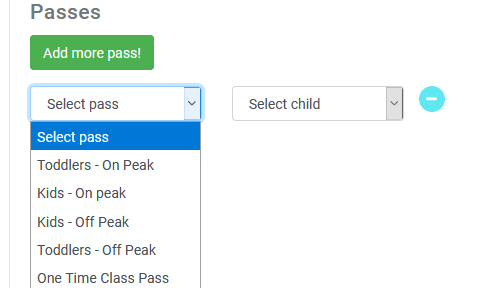
The software asked the wrong question first
I spotted the snag during staff training. The order screen asked staff to choose the type of pass first. They chose one from the full list, picked the child, then saw an eligibility error if the two didn’t match. It was an easy mistake to make in training, and a frustrating one to unwind with a family waiting at the desk.
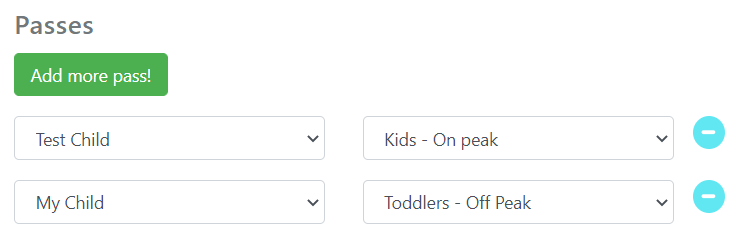
I documented the steps with screenshots. I asked the developer to start with the child, then use the age group to filter the passes and memberships the screen offered. Staff could make the right choice while they were building the order.
From a training session to a live change
The developer put the change on the test environment. I checked it on 19 May 2021 and asked for it to go live. Two days later the developer confirmed deployment and shared the updated order screen. The two screens below show where the eligibility decision moved.